Quick Answer: Use One Meaning for Each Signal
The most reliable BOMBANANA communication signals are short, exclusive, and repeatable. A signal should mean one thing every time. If "left" sometimes means the player's left and sometimes means the panel's left, it is not a signal yet; it is a new puzzle. Decide the perspective before the first module, then keep observations, manual decisions, and final actions in separate sentences.
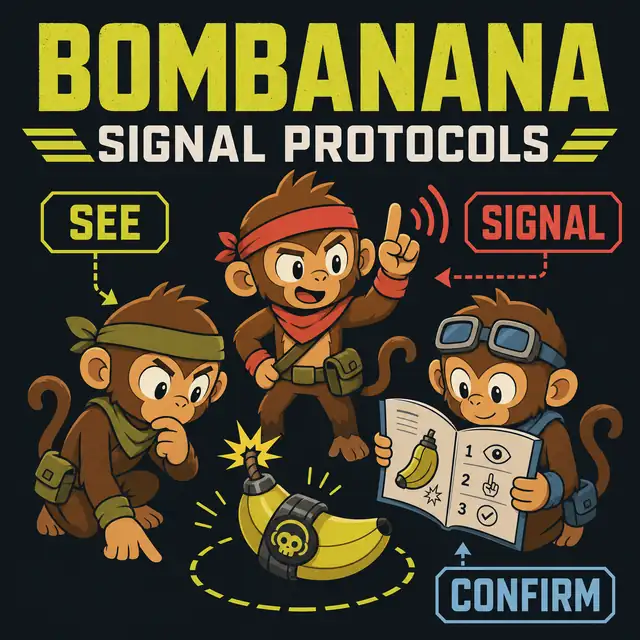
The basic handoff is see, signal, confirm, act. The bomb handler reports the visible module state. The manual reader checks the current rule. The communication bridge repeats one final instruction. The handler confirms that the instruction matches the panel and only then touches the control. This order answers the practical BOMBANANA co-op callout problem without relying on an unverified fixed answer.
Why BOMBANANA Signal Protocols Matter
BOMBANANA is built around an information gap between three co-op roles. The player near the bomb can see and interact with the module, while another player works from the manual and a third player helps turn separate observations into a shared instruction. That design makes communication part of the puzzle rather than a background convenience.
Teams usually lose time in three places. First, the handler begins with an incomplete description, so the manual reader has to ask several open questions. Second, everyone speaks while a rule branch is being chosen, so the final action is not obvious. Third, the panel changes after an input and the team continues from memory. A protocol gives each moment a visible boundary: report, interpret, confirm, then act.
The official Steam listing is the source for product identity, platform information, and Demo access. The templates below are editorial guidance. They are designed to remain useful when a module state, interface label, or demo build changes.
Three BOMBANANA Communication Signal Templates
Choose one template for the whole team before the timer starts. Do not combine half of one system with half of another during a difficult module. The starter protocol is easiest to learn, the standard protocol gives more precision, and the review protocol helps experienced teams diagnose a failed attempt.
| Template | Signal sequence | Best use | Failure it prevents |
|---|---|---|---|
| Starter | See - repeat - yes/no - act - solved | First session or a new group | Premature presses and talking over the final call |
| Standard | Module - state - branch - action - confirm - result | Regular teams handling mixed modules | Missing state details and ambiguous directions |
| Review | Fact - change - cause - next check - result | After a miss or a changed panel | Carrying an old answer into a new state |
1. Starter protocol for beginners
Use seven words at most: see, repeat, stop, wait, yes, no, and solved. The handler says "see" before describing the panel. The bridge says "repeat" when the instruction needs to be said again. Anyone can say "stop" to freeze the handler. "Wait" means the current state is not ready for an input. The group does not need a sophisticated gesture system on its first run; it needs a shared emergency brake and a clear success signal.
2. Standard protocol for module callouts
Use a fixed sentence shape: "Module; state; question; action; confirm." For example, the handler can report the module name, list numbers or switch positions in a known order, and ask for the relevant branch. The manual reader answers with one action. The bridge repeats that action with the same left/right perspective. The handler says yes or no, then acts. If a detail is missing, the correct signal is a question, not a guess.
3. Review protocol for recovery
When something goes wrong, say "stop" and return to facts. Name what changed: a light, number, switch, timer state, or screen. Then ask the manual reader for a new branch from the current state. This protocol avoids the common mistake of treating a failed input as a small interruption when it may have changed the evidence. After the attempt, review one communication step only, so the team can tell whether the new wording helped.
Five Rules for Better BOMBANANA Co-op Callouts
- Name the perspective. Say "panel left-to-right" or another fixed reference before using left and right.
- Separate fact from interpretation. A visible number is an observation; the meaning of that number belongs to the manual branch.
- Keep the final action singular. Give one press, one hold, one direction, or one wait instruction at a time.
- Make stop universal. Any player should be able to freeze the handler when a state is unclear or a sentence was misunderstood.
- Report the result. After an input, say solved, unchanged, changed, failed, or new state before starting the next callout.
These rules are useful for numeric panels, switches, wires, symbols, and other module families because they describe the information flow rather than a particular answer. For the broader role model, see the BOMBANANA manual guide. For a complete scan-to-recovery sequence, use the BOMBANANA walkthrough.
Test a Protocol in Ten Minutes
A protocol is only useful if the team can use it under pressure. Before a full run, practice the communication loop without chasing a fast clear.
- Minute 1: assign the handler, manual reader, and bridge.
- Minutes 2-3: agree on the perspective and the starter stop/repeat signals.
- Minutes 4-6: run three fictional states: a number panel, a switch row, and a changed state. The handler reports; the reader asks for one missing fact; the bridge repeats.
- Minutes 7-8: deliberately introduce one unclear direction. Check that anyone can say stop and restart the callout.
- Minutes 9-10: choose one wording to keep and one wording to remove before opening the Demo.
The goal is not to memorize a script. It is to make the next useful sentence obvious. When a team can identify whether a failure came from observation, interpretation, confirmation, or action, it can improve without rewriting its entire vocabulary.
Scope, Official Facts, and Related Guides
This page does not publish a permanent BOMBANANA puzzle answer, claim a fixed level total, or distribute an installer, APK, repack, or manual file. The current build and in-game manual should determine the actual action. Use the official BOMBANANA official Steam page for current availability.
For module-specific reading, continue to the switch module guide or calculator module guide. For team invitations and session setup, use play with friends. Search-intent research for this page reviewed current BOMBANANA signal, callout, module, and walkthrough results. Those results tend to answer one module or one role at a time; this page adds reusable protocol templates and a short practice loop without treating third-party explanations as official rules.
BOMBANANA Signal Protocol FAQ
What are the best BOMBANANA communication signals for beginners?
Start with see, repeat, stop, wait, yes, no, and solved. Give each signal one meaning and practice it before adding more words.
How should a BOMBANANA team call out a module?
Name the module, report its visible state in a fixed order, let the manual reader choose the branch, repeat one final action, and wait for confirmation before touching the control.
Do these BOMBANANA signal protocols reveal fixed puzzle answers?
No. They organize information and confirmation. The current game build and manual should determine the action; this page does not invent a permanent answer table.
How can a team get faster without speaking over each other?
Keep observations separate from instructions, use one speaker for the final call, and review one communication failure after each attempt instead of changing every signal at once.
Where should I get the BOMBANANA Demo?
Use the official BOMBANANA Steam page for current status. This site does not host installers or direct files and does not verify APK mirrors or repacks.
Sources and Editorial Scope
Official product identity and Demo access were checked against the BOMBANANA Steam listings on 16 August 2026. The protocol templates, examples, and generated illustration are fan-made editorial guidance. They explain how to pass information between players and do not represent developer rules or a permanent solution table.